






Super Sync Sports
Open the game- Brand
- Google Chrome
- Year
- 2013
- Objective
- Engagement
- Industry
- Tech & Telecom
- Mechanic
- Racing & Sports
- Platform
- Web
- Agency
- Rami Niemi
- With
- Rafael Rozendaal
- With
- WEIR+WONG




Objective
Google built Super Sync Sports to raise awareness of Chrome for mobile and prove, in a way people could feel rather than read about, that the browser links devices together across a session. The project doubled as a live showcase for HTML5, built entirely on open web tech with no plugins.
Solution
The player starts the game on a desktop in Chrome, picking a sport — running, cycling, or swimming — and a mode: solo, with up to three friends, or against the world leaderboard. A short code appears on the big screen; the player types it into g.co/super on their phone, and the phone turns into a wireless controller. From there they pick one of fifty illustrated athletes and race by dragging a finger along dotted lines on the phone screen, tracing them at the right rhythm to keep their runner moving. Every connected player's avatar shows up together on the shared desktop screen in a side-scrolling race, until someone crosses the line first.
- 1
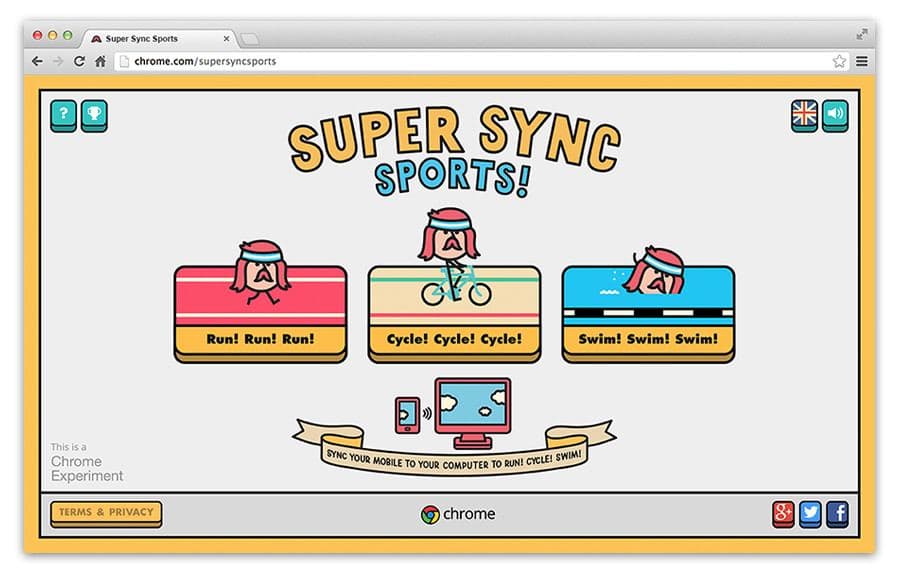
The player opens chrome.com/supersyncsports on a desktop or laptop in Chrome, landing on a title screen with the game's logo and a prompt to start.
- 2
The player picks one of three sports — running, cycling, or swimming — then chooses a mode: solo play, local play with up to four friends sharing the same screen, or a competitive attempt against a world leaderboard.
- 3
The computer screen displays a unique game code and directs the player to g.co/super; opening that address on a smartphone or tablet and entering the code pairs the device, turning it into a wireless controller.
- 4
On the paired phone, the player pages through fifty illustrated characters — including absurd options like a cupcake or a moose head — and confirms one to play as.
- 5
Up to three more friends join the same match by pairing their own phones with the same code, and all chosen avatars line up together on the shared screen before the race begins.
- 6
Each race is driven by phone-based gestures matched to on-screen prompts — such as tracing dotted lines at the right rhythm for running — and every gesture instantly advances the player's avatar in a side-scrolling race, with rival lanes shown alongside to reveal who is ahead.
- 7
The race ends at the finish line; in leaderboard mode the result is ranked against other players' times, and the player can then pick a different sport and play again.